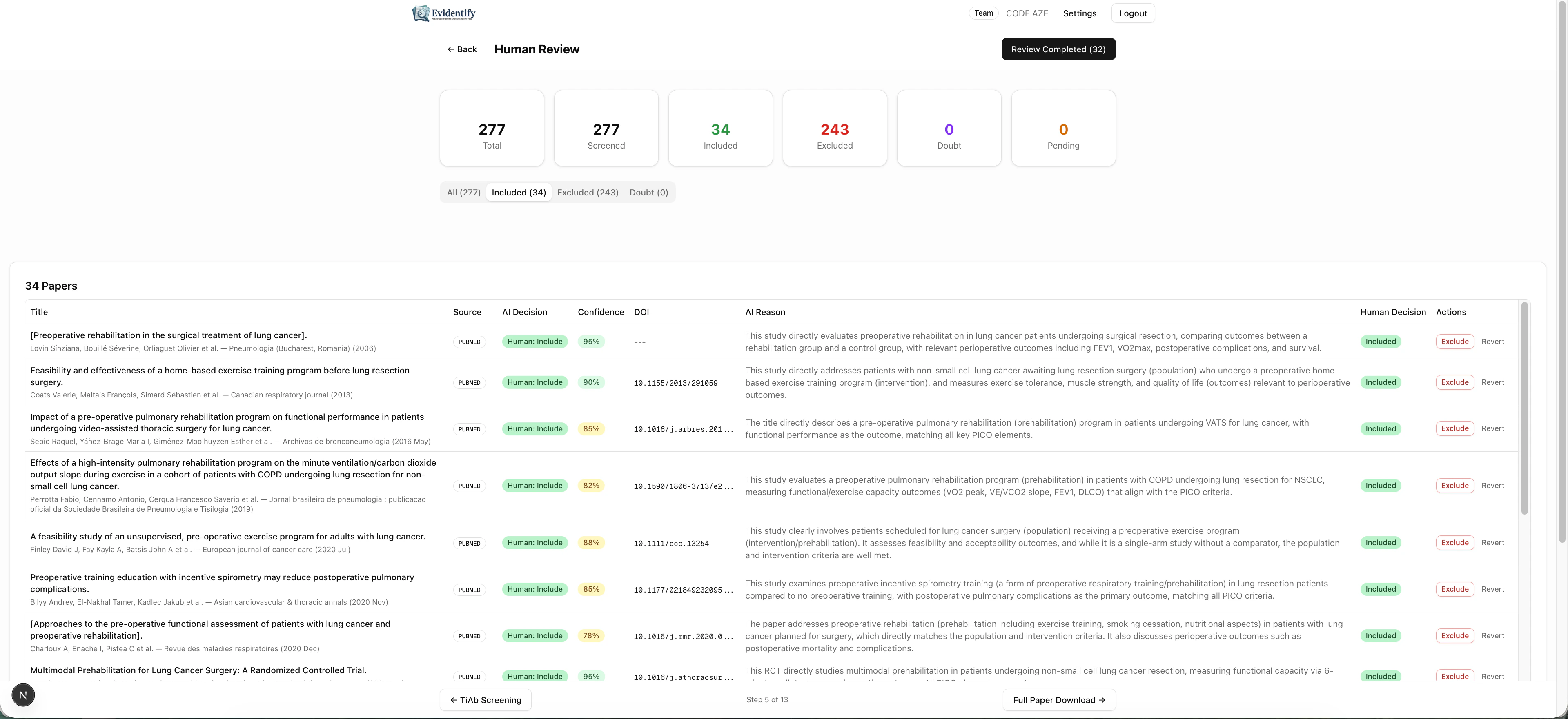
Human Review is the quality control gate where expert reviewers verify AI screening decisions. EviSyn ensures that no paper is included or excluded without human approval .
The Review Dashboard Navigate to Human Review from your project dashboard.
The stats bar shows:
Total papers to reviewScreened — how many have been through AI screeningIncluded (green) — papers approved for inclusionExcluded (red) — papers confirmed for exclusionDoubt (orange) — papers needing closer attentionPending — papers awaiting human decision
Reviewing Papers Each paper shows the AI’s recommendation alongside your review controls:
Making Decisions For each paper, you can:
Include — Confirm the paper should be in your reviewExclude — Confirm the paper should be removedDoubt — Flag for further discussion
Filtering Use the tabs to filter by category:
All — See everythingIncluded — Only AI-included papersExcluded — Only AI-excluded papersDoubt — Only uncertain papers (review these first)
Start with Doubt papers — these are the ones the AI was least confident about and most likely to benefit from human expertise.
Blinded Review Mode For methodological rigor, EviSyn supports blinded reviewer groups :
Multiple reviewer groups (R1, R2, R3, etc.) can be created
Each group reviews papers independently — without seeing AI decisions or other groups’ choices
The system tracks conflicts (disagreements between groups)
A senior reviewer resolves conflicts
Inter-Rater Agreement EviSyn automatically calculates Cohen’s kappa — the standard statistical measure of agreement between reviewers. This metric is:
Required for publication in most systematic review journals
Automatically computed when 2+ reviewer groups exist
Available in the review dashboard
Finalizing the Review Once all papers have human decisions and all conflicts are resolved, click Review Completed to finalize.
Finalizing locks the paper set. Papers cannot be added or removed after finalization. Make sure all decisions are correct before proceeding.
What’s Next? After finalizing, proceed to Full Paper Download & Full-Text Screening .