

PRISMA 2020 Flow Diagram
Navigate to Export & Report from your project dashboard.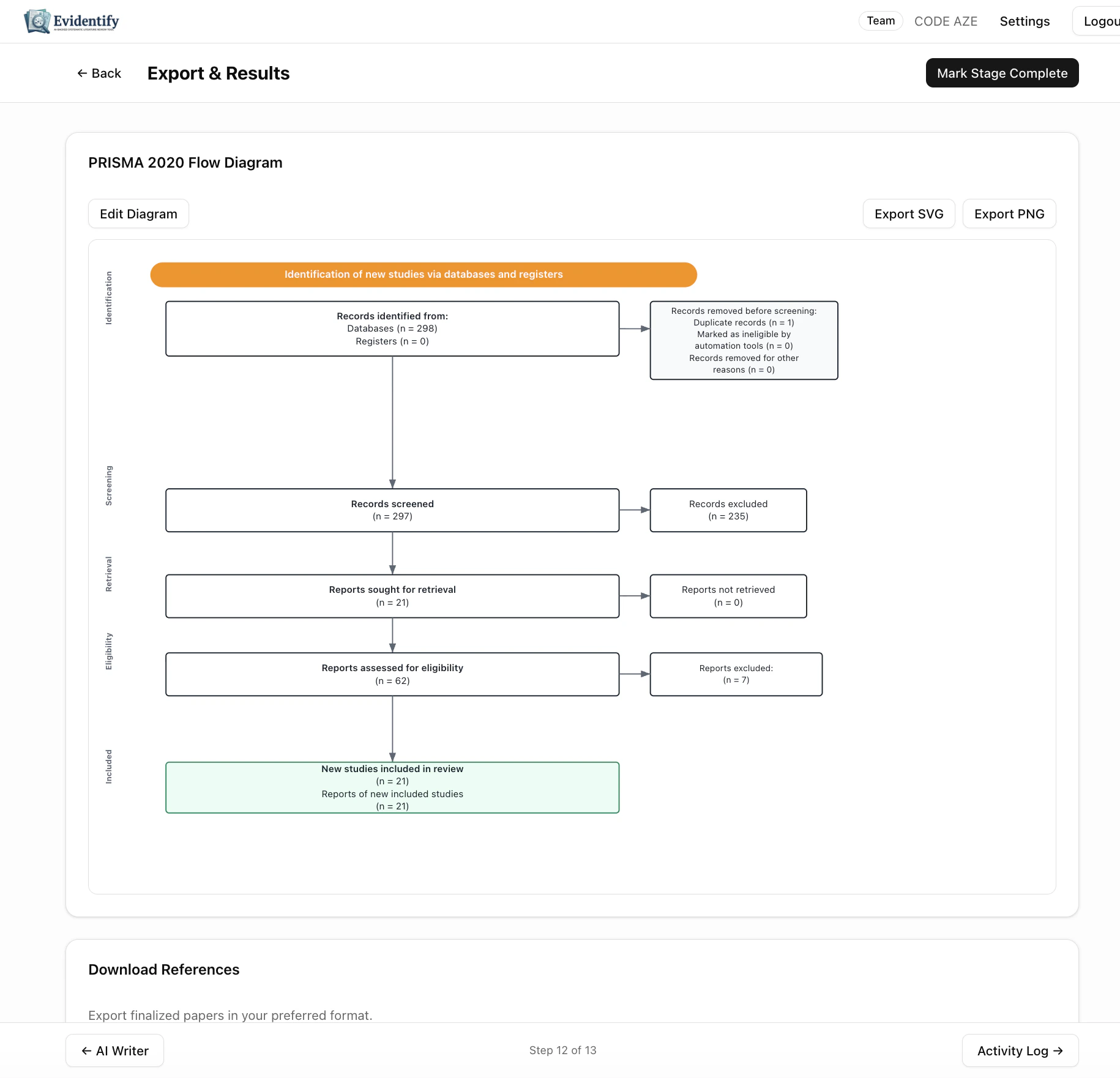
- Identification — Records identified from databases and registers
- Screening — Records screened, duplicates removed
- Eligibility — Reports sought and assessed for eligibility
- Included — Studies included in the final review
Customization
Click Edit Diagram to override any count or label. This is useful for:- Adding records from hand searches or grey literature
- Correcting counts for unusual workflows
- Adding notes or annotations
Export Formats
Download References
Export your finalized paper set in standard reference formats:Activity Log
The Activity Log (accessible from the last step) provides a complete, immutable audit trail of every action taken in your project:- Who performed each action (user identity)
- What was done (screening decision, data edit, status change)
- When it happened (timestamp)
- Details of the action (old value, new value, reasoning)
Export
Click Export CSV to download the full activity log for:- Journal submission (reproducibility requirements)
- Regulatory compliance (FDA, EMA submissions)
- Internal auditing
- PROSPERO protocol updates
The activity log is immutable — entries cannot be deleted or modified after creation. This ensures the integrity of your audit trail.