> ## Documentation Index
> Fetch the complete documentation index at: https://docs-evisyn.grabmywork.com/llms.txt
> Use this file to discover all available pages before exploring further.
# Search Strategy
> AI-powered PICO decomposition and database-specific query generation
The search strategy is the foundation of your systematic review. EviSyn's AI analyzes your research question and generates structured, database-specific search queries — a task that traditionally takes 20-40 hours of expert time.
## Step 1: Configure Your Strategy
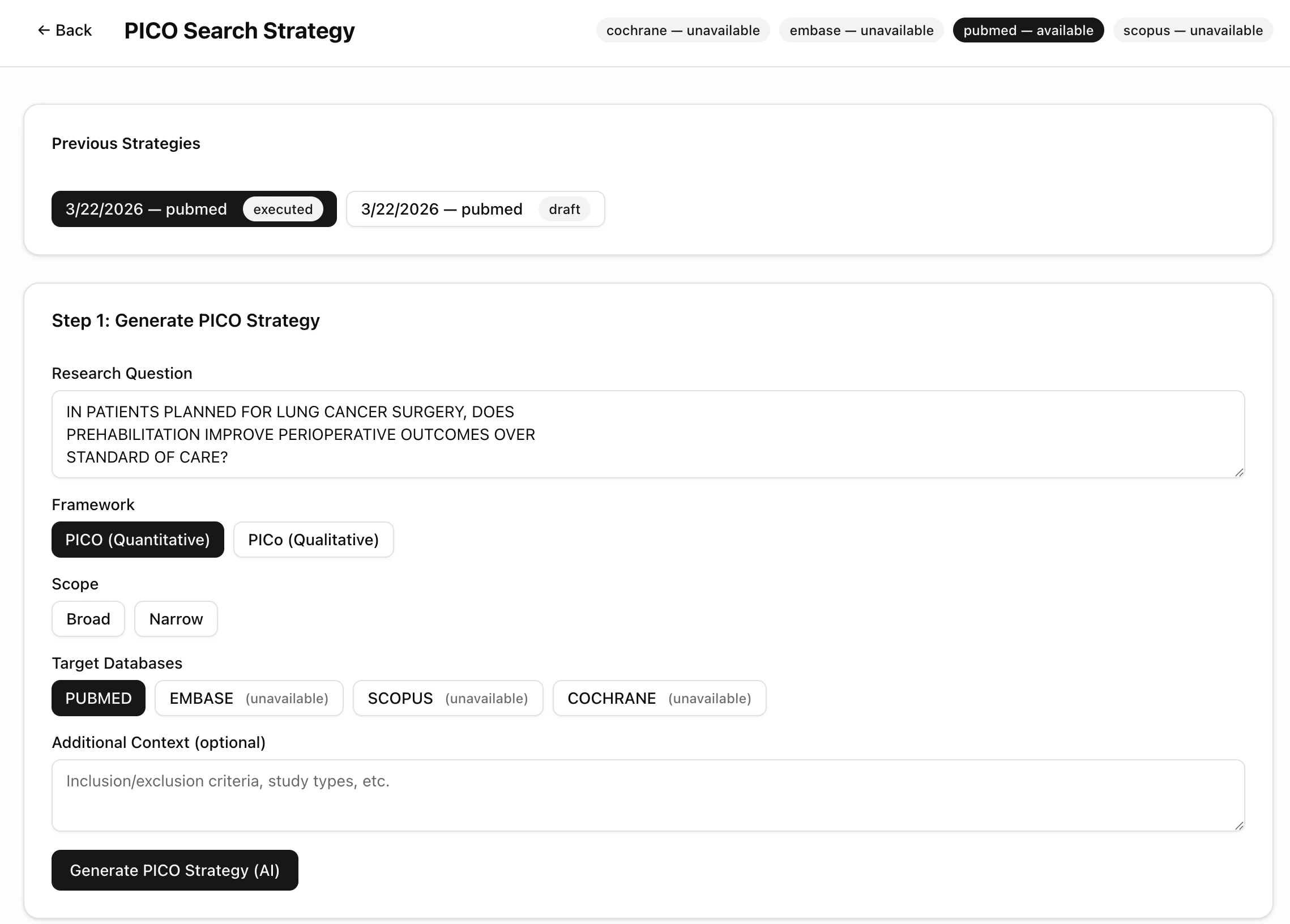
Navigate to **Search Strategy** from your project dashboard.
 ### Settings
| Setting | Options | Description |
| ---------------------- | ---------------------------------------- | --------------------------------------------------------------------------- |
| **Framework** | PICO (Quantitative) / PICo (Qualitative) | PICO for intervention studies, PICo for qualitative research |
| **Scope** | Broad / Narrow | Broad captures more results with higher sensitivity; Narrow is more precise |
| **Target Databases** | PubMed, EMBASE, Scopus, Cochrane | Select which databases to generate queries for |
| **Additional Context** | Free text | Optional: add inclusion/exclusion criteria or study type filters |
**PubMed** is available on all plans. EMBASE, Scopus, and Cochrane require API keys configured in [Settings](/user-guide/api-keys).
### Previous Strategies
You can generate multiple strategies and compare them. Each strategy is saved with its date, database, and status (draft or executed).
Click **Generate PICO Strategy (AI)** to run the AI decomposition.
## Step 2: Review PICO Decomposition
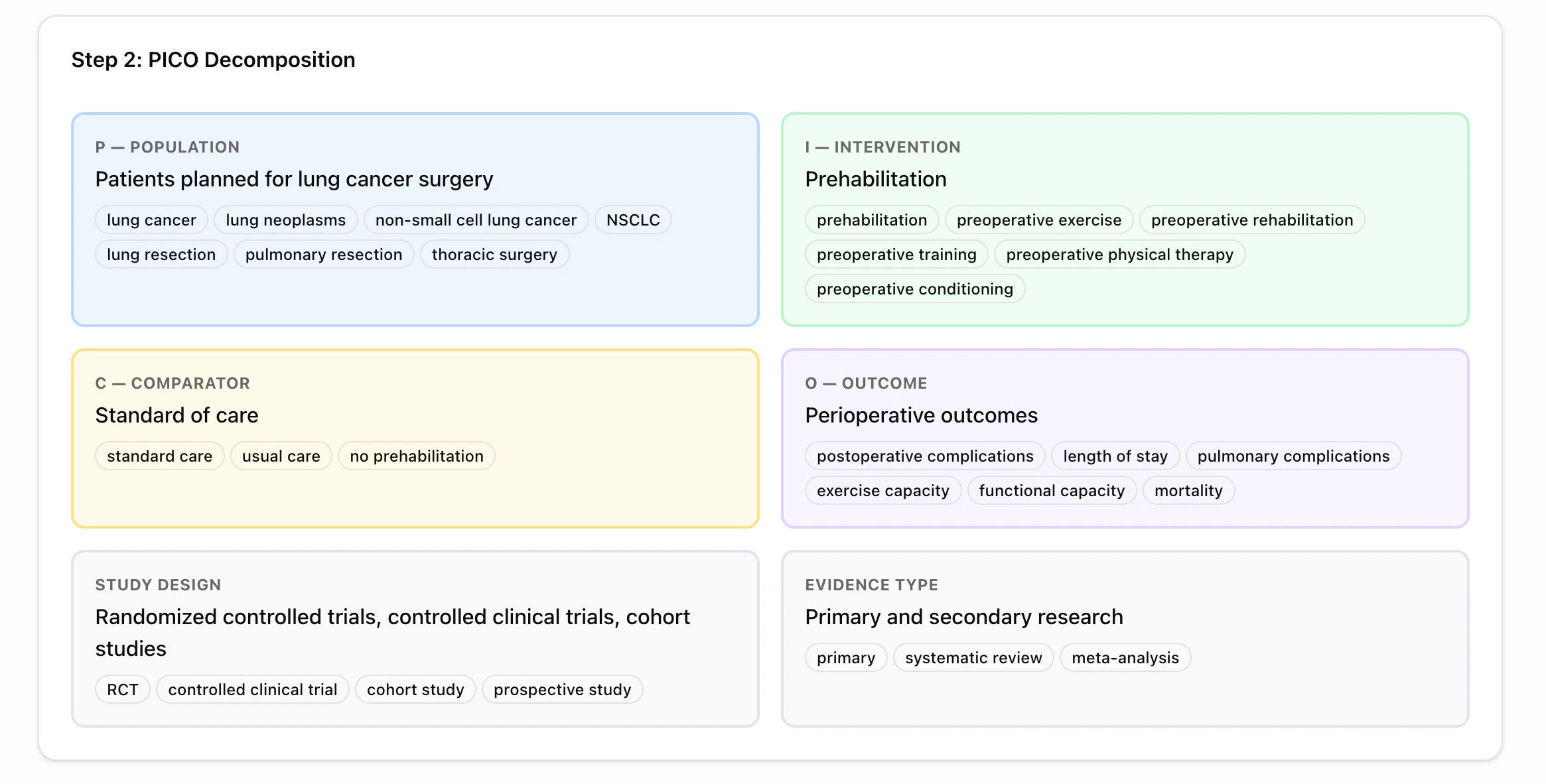
The AI breaks your research question into structured PICO components, each with suggested search terms.
### Settings
| Setting | Options | Description |
| ---------------------- | ---------------------------------------- | --------------------------------------------------------------------------- |
| **Framework** | PICO (Quantitative) / PICo (Qualitative) | PICO for intervention studies, PICo for qualitative research |
| **Scope** | Broad / Narrow | Broad captures more results with higher sensitivity; Narrow is more precise |
| **Target Databases** | PubMed, EMBASE, Scopus, Cochrane | Select which databases to generate queries for |
| **Additional Context** | Free text | Optional: add inclusion/exclusion criteria or study type filters |
**PubMed** is available on all plans. EMBASE, Scopus, and Cochrane require API keys configured in [Settings](/user-guide/api-keys).
### Previous Strategies
You can generate multiple strategies and compare them. Each strategy is saved with its date, database, and status (draft or executed).
Click **Generate PICO Strategy (AI)** to run the AI decomposition.
## Step 2: Review PICO Decomposition
The AI breaks your research question into structured PICO components, each with suggested search terms.
 ### What You Get
Who is being studied? Includes MeSH terms and free-text synonyms.
*Example: "Patients planned for lung cancer surgery" → lung cancer, lung neoplasms, NSCLC, thoracic surgery*
What treatment or action is being applied?
*Example: "Prehabilitation" → preoperative exercise, preoperative rehabilitation, preoperative conditioning*
What is it compared against?
*Example: "Standard of care" → usual care, no prehabilitation*
What is being measured?
*Example: "Perioperative outcomes" → postoperative complications, length of stay, mortality*
The AI also identifies:
* **Study Design** — RCTs, controlled clinical trials, cohort studies
* **Evidence Type** — Primary research, systematic reviews, meta-analyses
You can edit the PICO terms before generating queries. Add or remove synonyms to adjust sensitivity.
## Step 3: Review & Edit Queries
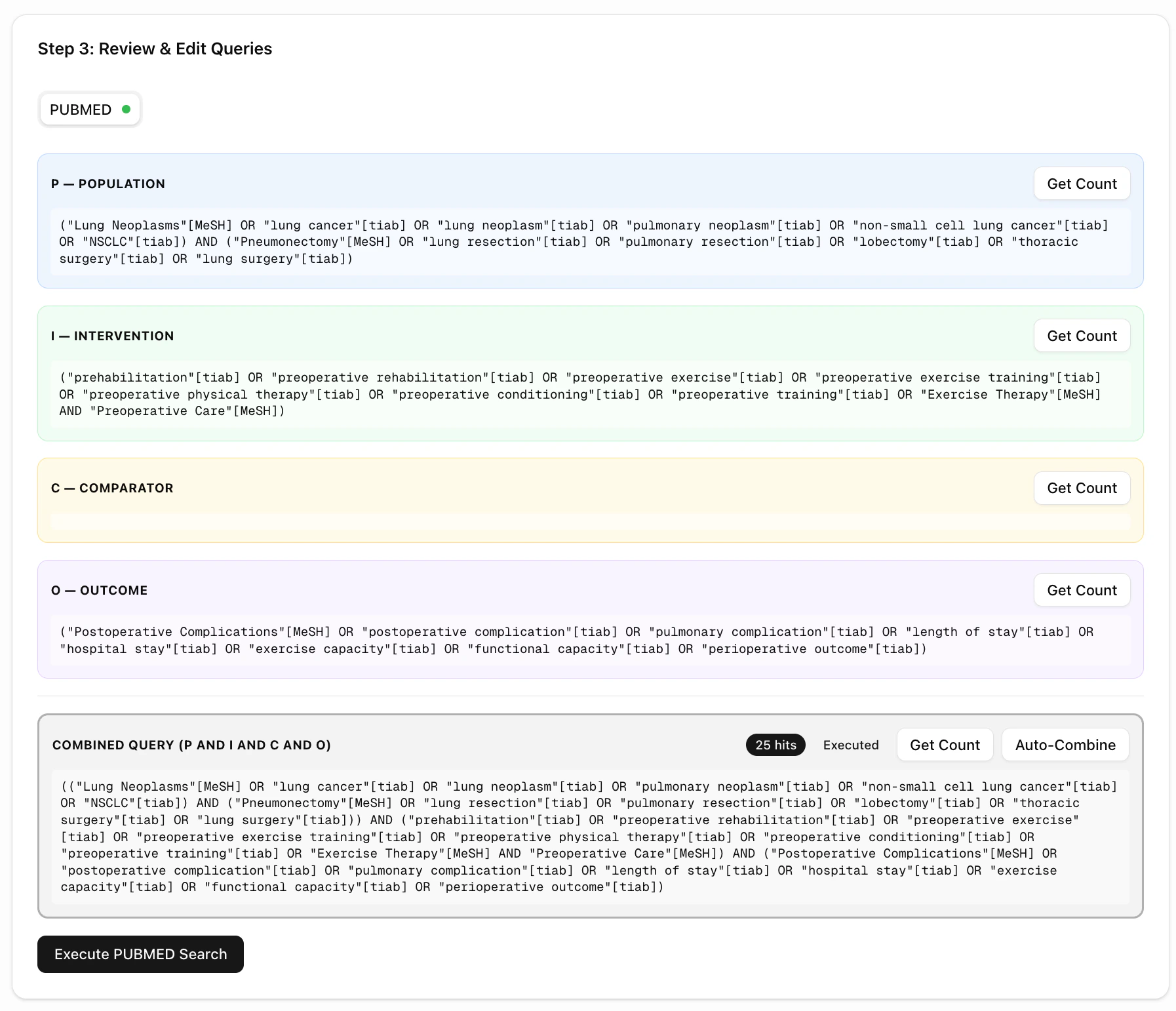
The AI generates database-specific boolean queries for each PICO element and a combined query.
### What You Get
Who is being studied? Includes MeSH terms and free-text synonyms.
*Example: "Patients planned for lung cancer surgery" → lung cancer, lung neoplasms, NSCLC, thoracic surgery*
What treatment or action is being applied?
*Example: "Prehabilitation" → preoperative exercise, preoperative rehabilitation, preoperative conditioning*
What is it compared against?
*Example: "Standard of care" → usual care, no prehabilitation*
What is being measured?
*Example: "Perioperative outcomes" → postoperative complications, length of stay, mortality*
The AI also identifies:
* **Study Design** — RCTs, controlled clinical trials, cohort studies
* **Evidence Type** — Primary research, systematic reviews, meta-analyses
You can edit the PICO terms before generating queries. Add or remove synonyms to adjust sensitivity.
## Step 3: Review & Edit Queries
The AI generates database-specific boolean queries for each PICO element and a combined query.
 ### Per-Element Queries
Each PICO element has its own query panel showing:
* **Boolean query** with MeSH terms (for PubMed) or free-text terms
* **Get Count** button — preview how many results each element returns
* Editable text — modify queries before executing
### Combined Query
At the bottom, the **Combined Query** merges all elements using `AND` logic:
```
(Population terms) AND (Intervention terms) AND (Comparator terms) AND (Outcome terms)
```
You can:
* Click **Get Count** to preview total hits
* Click **Auto-Combine** to regenerate the combined query from current elements
* Edit the combined query directly
### Execute the Search
Click **Execute PUBMED Search** to run the query and import results directly into your project.
The hit count badge (e.g., "25 hits") shows how many papers matched. Papers are imported with full metadata: title, authors, journal, year, DOI, and abstract.
## What's Next?
After executing your search (or uploading files manually), proceed to [Import Files](/user-guide/importing-papers) to review your imported papers.
### Per-Element Queries
Each PICO element has its own query panel showing:
* **Boolean query** with MeSH terms (for PubMed) or free-text terms
* **Get Count** button — preview how many results each element returns
* Editable text — modify queries before executing
### Combined Query
At the bottom, the **Combined Query** merges all elements using `AND` logic:
```
(Population terms) AND (Intervention terms) AND (Comparator terms) AND (Outcome terms)
```
You can:
* Click **Get Count** to preview total hits
* Click **Auto-Combine** to regenerate the combined query from current elements
* Edit the combined query directly
### Execute the Search
Click **Execute PUBMED Search** to run the query and import results directly into your project.
The hit count badge (e.g., "25 hits") shows how many papers matched. Papers are imported with full metadata: title, authors, journal, year, DOI, and abstract.
## What's Next?
After executing your search (or uploading files manually), proceed to [Import Files](/user-guide/importing-papers) to review your imported papers.