> ## Documentation Index
> Fetch the complete documentation index at: https://docs-evisyn.grabmywork.com/llms.txt
> Use this file to discover all available pages before exploring further.
# Workflow Overview
> The 13-step PRISMA 2020 workflow that powers every EviSyn review
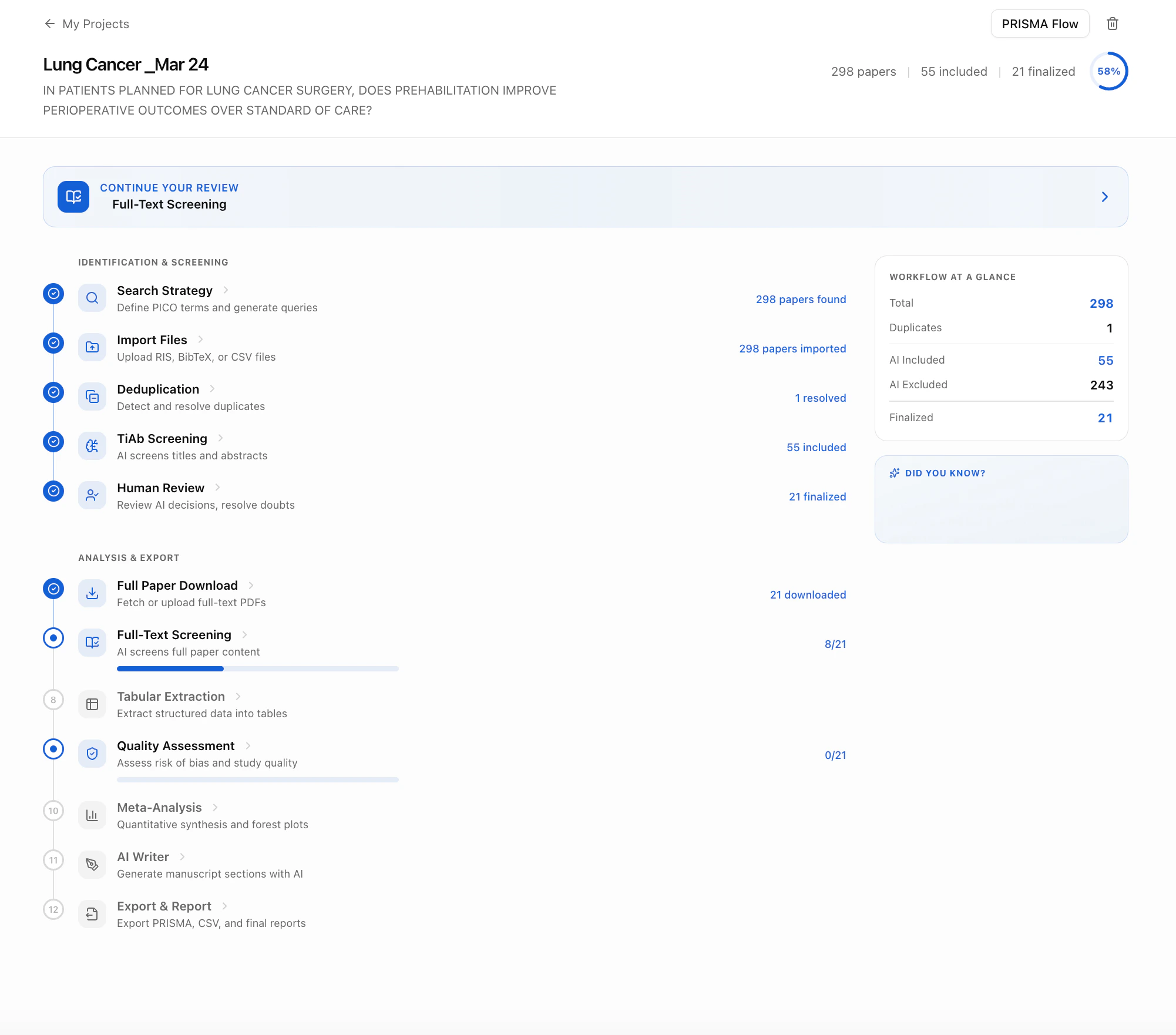
EviSyn guides you through a structured, sequential workflow aligned with the **PRISMA 2020** reporting framework. Each step has built-in validation gates — you can't skip ahead until the current step is complete.
 ## Identification & Screening
These first five steps take you from a research question to a finalized set of relevant papers.
| Step | Name | What happens |
| ---- | ---------------------------------------------- | ----------------------------------------------------------------------------------- |
| 1 | [Search Strategy](/user-guide/search-strategy) | AI decomposes your question into PICO terms and generates database-specific queries |
| 2 | [Import Files](/user-guide/importing-papers) | Search PubMed directly or upload RIS/BibTeX/CSV from any database |
| 3 | [Deduplication](/user-guide/deduplication) | 4-layer duplicate detection: DOI, title, fuzzy, and semantic |
| 4 | [TiAb Screening](/user-guide/ai-screening) | AI screens every title & abstract with confidence + PICO evaluation |
| 5 | [Human Review](/user-guide/human-review) | Reviewers verify AI decisions, resolve conflicts |
## Analysis & Export
Once your paper set is finalized, these steps handle deep analysis and output generation.
| Step | Name | What happens |
| ---- | ------------------------------------------------------ | -------------------------------------------------------------- |
| 6 | [Full Paper Download](/user-guide/full-text-screening) | Auto-retrieve PDFs from PMC, Unpaywall, Semantic Scholar |
| 7 | [Full-Text Screening](/user-guide/full-text-screening) | AI reads entire papers and scores relevance section-by-section |
| 8 | [Tabular Extraction](/user-guide/data-extraction) | AI extracts structured data into custom-defined tables |
| 9 | [Quality Assessment](/user-guide/quality-assessment) | AI-assisted RoB2 and GRADE with evidence citations |
| 10 | [Meta-Analysis](/user-guide/meta-analysis) | Forest plots, effect sizes, risk of bias visualization |
| 11 | [AI Writer](/user-guide/manuscript-writer) | AI manuscript agent for drafting Results & Discussion |
| 12 | [Export & Report](/user-guide/export-and-reporting) | PRISMA flow diagram, BibTeX/RIS/CSV, activity log |
## Progress Tracking
The **Workflow at a Glance** sidebar on your project dashboard shows live stats:
* **Total** papers in your library
* **Duplicates** detected
* **AI Included / AI Excluded** from screening
* **Finalized** papers for analysis
The blue **"Continue Your Review"** banner always tells you the recommended next step. Follow it for the smoothest experience.
## Validation Gates
EviSyn enforces quality through **validation gates** between stages:
* You can't start screening until papers are imported
* You can't finalize until human review conflicts are resolved
* You can't run quality assessment until papers are finalized
* Each stage must be explicitly marked complete before the next unlocks
This prevents incomplete work from propagating through your review.
## Identification & Screening
These first five steps take you from a research question to a finalized set of relevant papers.
| Step | Name | What happens |
| ---- | ---------------------------------------------- | ----------------------------------------------------------------------------------- |
| 1 | [Search Strategy](/user-guide/search-strategy) | AI decomposes your question into PICO terms and generates database-specific queries |
| 2 | [Import Files](/user-guide/importing-papers) | Search PubMed directly or upload RIS/BibTeX/CSV from any database |
| 3 | [Deduplication](/user-guide/deduplication) | 4-layer duplicate detection: DOI, title, fuzzy, and semantic |
| 4 | [TiAb Screening](/user-guide/ai-screening) | AI screens every title & abstract with confidence + PICO evaluation |
| 5 | [Human Review](/user-guide/human-review) | Reviewers verify AI decisions, resolve conflicts |
## Analysis & Export
Once your paper set is finalized, these steps handle deep analysis and output generation.
| Step | Name | What happens |
| ---- | ------------------------------------------------------ | -------------------------------------------------------------- |
| 6 | [Full Paper Download](/user-guide/full-text-screening) | Auto-retrieve PDFs from PMC, Unpaywall, Semantic Scholar |
| 7 | [Full-Text Screening](/user-guide/full-text-screening) | AI reads entire papers and scores relevance section-by-section |
| 8 | [Tabular Extraction](/user-guide/data-extraction) | AI extracts structured data into custom-defined tables |
| 9 | [Quality Assessment](/user-guide/quality-assessment) | AI-assisted RoB2 and GRADE with evidence citations |
| 10 | [Meta-Analysis](/user-guide/meta-analysis) | Forest plots, effect sizes, risk of bias visualization |
| 11 | [AI Writer](/user-guide/manuscript-writer) | AI manuscript agent for drafting Results & Discussion |
| 12 | [Export & Report](/user-guide/export-and-reporting) | PRISMA flow diagram, BibTeX/RIS/CSV, activity log |
## Progress Tracking
The **Workflow at a Glance** sidebar on your project dashboard shows live stats:
* **Total** papers in your library
* **Duplicates** detected
* **AI Included / AI Excluded** from screening
* **Finalized** papers for analysis
The blue **"Continue Your Review"** banner always tells you the recommended next step. Follow it for the smoothest experience.
## Validation Gates
EviSyn enforces quality through **validation gates** between stages:
* You can't start screening until papers are imported
* You can't finalize until human review conflicts are resolved
* You can't run quality assessment until papers are finalized
* Each stage must be explicitly marked complete before the next unlocks
This prevents incomplete work from propagating through your review.