> ## Documentation Index
> Fetch the complete documentation index at: https://docs-evisyn.grabmywork.com/llms.txt
> Use this file to discover all available pages before exploring further.
# Manuscript Writer
> AI-powered manuscript drafting with section-based editing
The Manuscript Writer is an AI co-pilot that helps you draft publication-ready manuscript sections. Powered by Claude (a more advanced model than screening), it can access your project data, run queries, and generate academic prose with proper citations.
## The Editor
Navigate to **AI Writer** from your project dashboard.
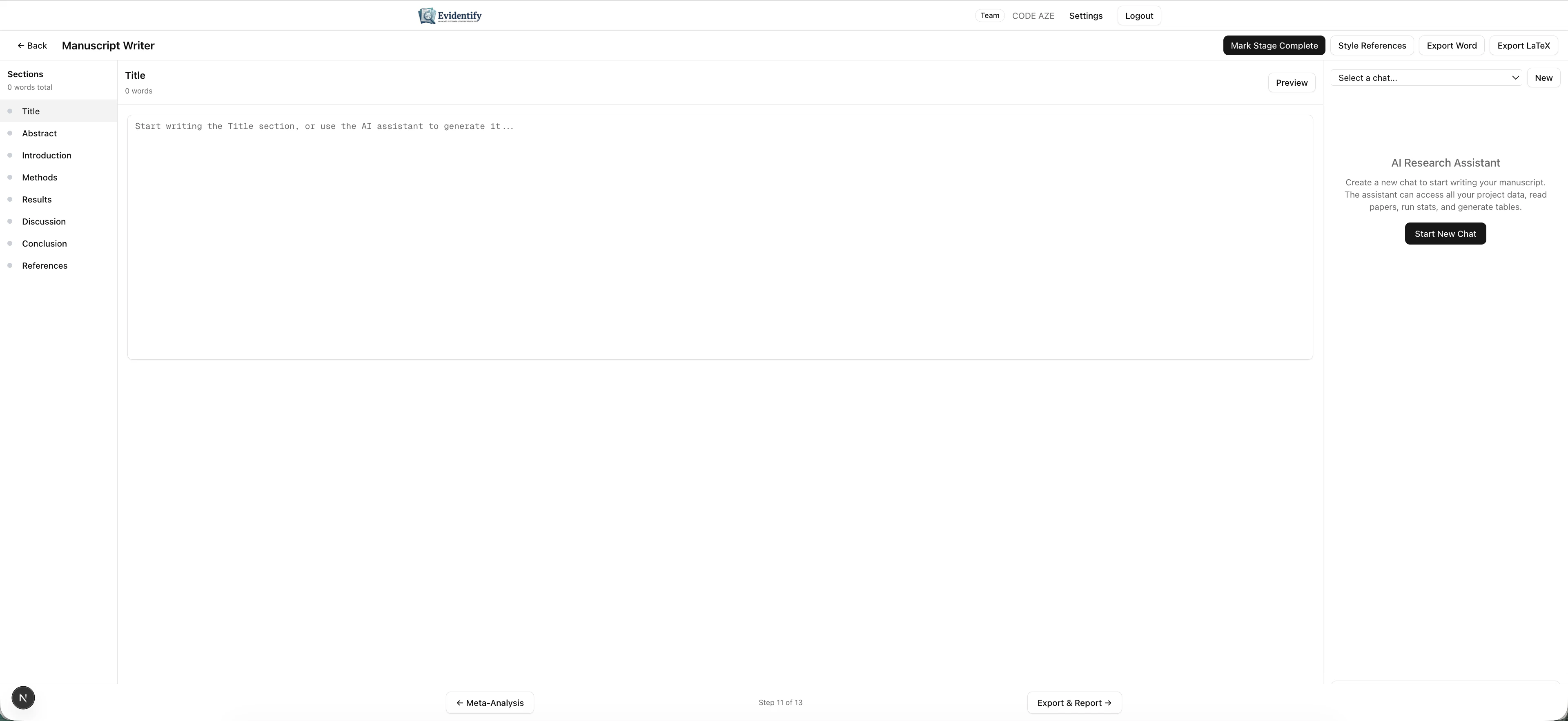 ### Layout
The interface has three panels:
| Panel | Description |
| --------------------------------- | --------------------------------------------------------------------------------------------------------- |
| **Sections (left)** | Manuscript structure: Title, Abstract, Introduction, Methods, Results, Discussion, Conclusion, References |
| **Editor (center)** | Write and edit your manuscript content |
| **AI Research Assistant (right)** | Chat with the AI to generate, refine, or restructure content |
### Section Navigation
Click any section in the left sidebar to navigate to it. Each section shows:
* Section name
* Word count
* Expand/collapse for sub-sections
## Using the AI Research Assistant
Click **Start New Chat** to begin a conversation with the AI assistant.
The AI can:
* **Generate draft sections** — "Write the Results section based on my screening data and extraction tables"
* **Access project data** — It can query your papers, screening decisions, extractions, and quality assessments
* **Run statistical summaries** — "How many papers were included at each stage?"
* **Generate tables** — "Create a characteristics of included studies table"
* **Insert citations** — Automatically references your included papers
* **Refine prose** — "Make this paragraph more concise" or "Rewrite in passive voice"
### Multi-Session Support
You can have multiple independent chat sessions. Select from the dropdown at the top right:
* **New** — Start a fresh conversation
* **Select a chat** — Resume a previous conversation
### Export Options
| Format | Description |
| ----------------------- | ---------------------------------------------- |
| **Export Word** | Download as .docx for further editing |
| **Export LaTeX** | Download as .tex for LaTeX workflows |
| **Style References** | Format references in a specific citation style |
| **Mark Stage Complete** | Finalize the manuscript stage |
The AI remembers your full conversation within a session. You can iteratively refine a section across multiple messages — "Add more detail about the heterogeneity" or "Move the limitations paragraph to the end."
## What's Next?
After drafting your manuscript, proceed to [Export & Reporting](/user-guide/export-and-reporting) for the final deliverables.
### Layout
The interface has three panels:
| Panel | Description |
| --------------------------------- | --------------------------------------------------------------------------------------------------------- |
| **Sections (left)** | Manuscript structure: Title, Abstract, Introduction, Methods, Results, Discussion, Conclusion, References |
| **Editor (center)** | Write and edit your manuscript content |
| **AI Research Assistant (right)** | Chat with the AI to generate, refine, or restructure content |
### Section Navigation
Click any section in the left sidebar to navigate to it. Each section shows:
* Section name
* Word count
* Expand/collapse for sub-sections
## Using the AI Research Assistant
Click **Start New Chat** to begin a conversation with the AI assistant.
The AI can:
* **Generate draft sections** — "Write the Results section based on my screening data and extraction tables"
* **Access project data** — It can query your papers, screening decisions, extractions, and quality assessments
* **Run statistical summaries** — "How many papers were included at each stage?"
* **Generate tables** — "Create a characteristics of included studies table"
* **Insert citations** — Automatically references your included papers
* **Refine prose** — "Make this paragraph more concise" or "Rewrite in passive voice"
### Multi-Session Support
You can have multiple independent chat sessions. Select from the dropdown at the top right:
* **New** — Start a fresh conversation
* **Select a chat** — Resume a previous conversation
### Export Options
| Format | Description |
| ----------------------- | ---------------------------------------------- |
| **Export Word** | Download as .docx for further editing |
| **Export LaTeX** | Download as .tex for LaTeX workflows |
| **Style References** | Format references in a specific citation style |
| **Mark Stage Complete** | Finalize the manuscript stage |
The AI remembers your full conversation within a session. You can iteratively refine a section across multiple messages — "Add more detail about the heterogeneity" or "Move the limitations paragraph to the end."
## What's Next?
After drafting your manuscript, proceed to [Export & Reporting](/user-guide/export-and-reporting) for the final deliverables.