> ## Documentation Index
> Fetch the complete documentation index at: https://docs-evisyn.grabmywork.com/llms.txt
> Use this file to discover all available pages before exploring further.
# Human Review
> Verify AI decisions with blinded assessment and conflict resolution
Human Review is the quality control gate where expert reviewers verify AI screening decisions. EviSyn ensures that **no paper is included or excluded without human approval**.
## The Review Dashboard
Navigate to **Human Review** from your project dashboard.
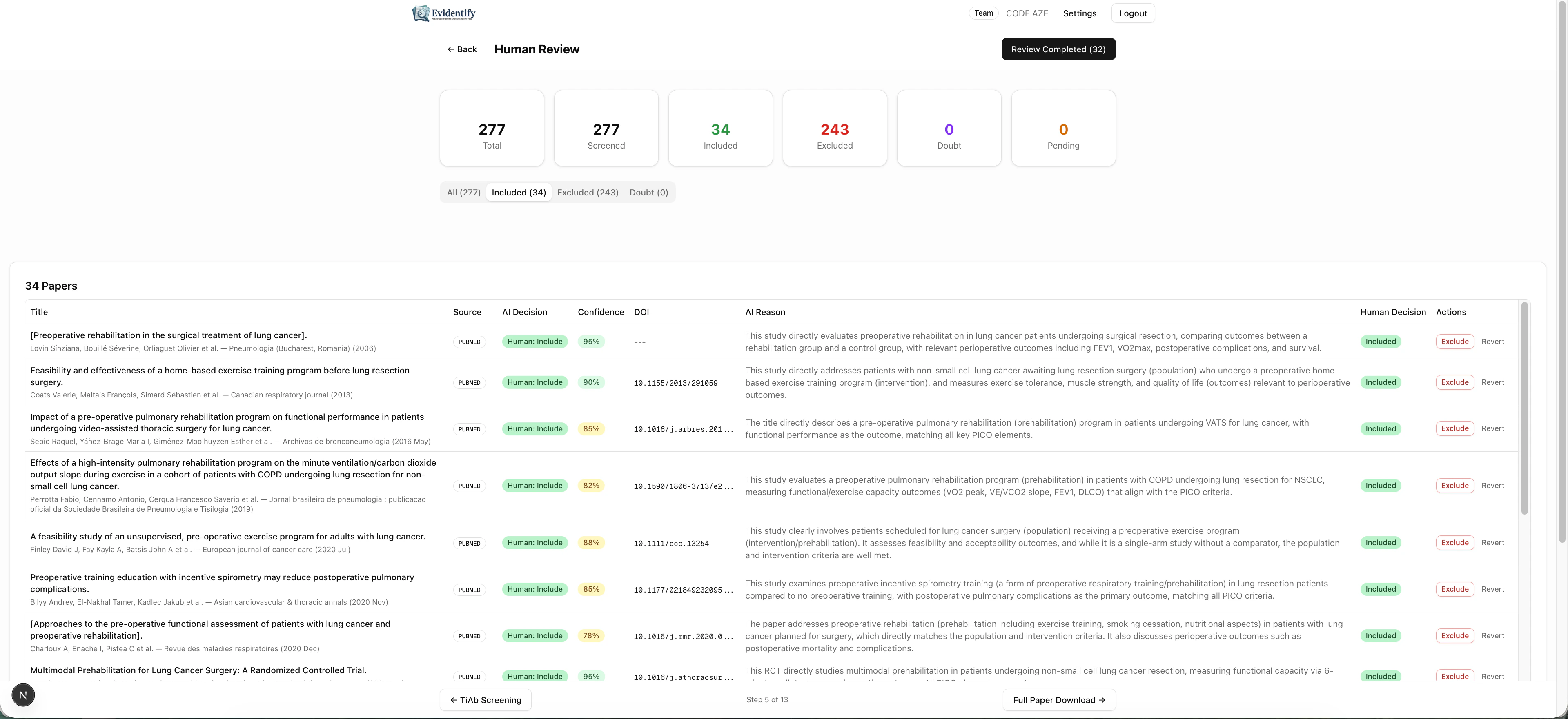 The stats bar shows:
* **Total** papers to review
* **Screened** — how many have been through AI screening
* **Included** (green) — papers approved for inclusion
* **Excluded** (red) — papers confirmed for exclusion
* **Doubt** (orange) — papers needing closer attention
* **Pending** — papers awaiting human decision
## Reviewing Papers
Each paper shows the AI's recommendation alongside your review controls:
| Column | Description |
| ------------------ | ----------------------------------------------- |
| **Title** | Paper title (click to expand full details) |
| **Source** | Original database |
| **AI Decision** | The AI's recommendation (include/exclude/doubt) |
| **Confidence** | AI confidence percentage |
| **DOI** | Digital Object Identifier |
| **AI Reason** | Plain-language explanation |
| **Human Decision** | Your decision (accept dropdown) |
| **Actions** | Accept/reject buttons |
### Making Decisions
For each paper, you can:
* **Include** — Confirm the paper should be in your review
* **Exclude** — Confirm the paper should be removed
* **Doubt** — Flag for further discussion
### Filtering
Use the tabs to filter by category:
* **All** — See everything
* **Included** — Only AI-included papers
* **Excluded** — Only AI-excluded papers
* **Doubt** — Only uncertain papers (review these first)
Start with **Doubt** papers — these are the ones the AI was least confident about and most likely to benefit from human expertise.
## Blinded Review Mode
For methodological rigor, EviSyn supports **blinded reviewer groups**:
* Multiple reviewer groups (R1, R2, R3, etc.) can be created
* Each group reviews papers **independently** — without seeing AI decisions or other groups' choices
* The system tracks **conflicts** (disagreements between groups)
* A senior reviewer resolves conflicts
### Inter-Rater Agreement
EviSyn automatically calculates **Cohen's kappa** — the standard statistical measure of agreement between reviewers. This metric is:
* Required for publication in most systematic review journals
* Automatically computed when 2+ reviewer groups exist
* Available in the review dashboard
## Finalizing the Review
Once all papers have human decisions and all conflicts are resolved, click **Review Completed** to finalize.
Finalizing locks the paper set. Papers cannot be added or removed after finalization. Make sure all decisions are correct before proceeding.
## What's Next?
After finalizing, proceed to [Full Paper Download & Full-Text Screening](/user-guide/full-text-screening).
The stats bar shows:
* **Total** papers to review
* **Screened** — how many have been through AI screening
* **Included** (green) — papers approved for inclusion
* **Excluded** (red) — papers confirmed for exclusion
* **Doubt** (orange) — papers needing closer attention
* **Pending** — papers awaiting human decision
## Reviewing Papers
Each paper shows the AI's recommendation alongside your review controls:
| Column | Description |
| ------------------ | ----------------------------------------------- |
| **Title** | Paper title (click to expand full details) |
| **Source** | Original database |
| **AI Decision** | The AI's recommendation (include/exclude/doubt) |
| **Confidence** | AI confidence percentage |
| **DOI** | Digital Object Identifier |
| **AI Reason** | Plain-language explanation |
| **Human Decision** | Your decision (accept dropdown) |
| **Actions** | Accept/reject buttons |
### Making Decisions
For each paper, you can:
* **Include** — Confirm the paper should be in your review
* **Exclude** — Confirm the paper should be removed
* **Doubt** — Flag for further discussion
### Filtering
Use the tabs to filter by category:
* **All** — See everything
* **Included** — Only AI-included papers
* **Excluded** — Only AI-excluded papers
* **Doubt** — Only uncertain papers (review these first)
Start with **Doubt** papers — these are the ones the AI was least confident about and most likely to benefit from human expertise.
## Blinded Review Mode
For methodological rigor, EviSyn supports **blinded reviewer groups**:
* Multiple reviewer groups (R1, R2, R3, etc.) can be created
* Each group reviews papers **independently** — without seeing AI decisions or other groups' choices
* The system tracks **conflicts** (disagreements between groups)
* A senior reviewer resolves conflicts
### Inter-Rater Agreement
EviSyn automatically calculates **Cohen's kappa** — the standard statistical measure of agreement between reviewers. This metric is:
* Required for publication in most systematic review journals
* Automatically computed when 2+ reviewer groups exist
* Available in the review dashboard
## Finalizing the Review
Once all papers have human decisions and all conflicts are resolved, click **Review Completed** to finalize.
Finalizing locks the paper set. Papers cannot be added or removed after finalization. Make sure all decisions are correct before proceeding.
## What's Next?
After finalizing, proceed to [Full Paper Download & Full-Text Screening](/user-guide/full-text-screening).