> ## Documentation Index
> Fetch the complete documentation index at: https://docs-evisyn.grabmywork.com/llms.txt
> Use this file to discover all available pages before exploring further.
# Full-Text Screening
> Retrieve PDFs automatically and run AI analysis on complete papers
After human review, the next steps are retrieving full-text PDFs and running a deeper AI analysis on the complete papers.
## Step 1: Full Paper Download
Navigate to **Full Paper Download** from your project dashboard.
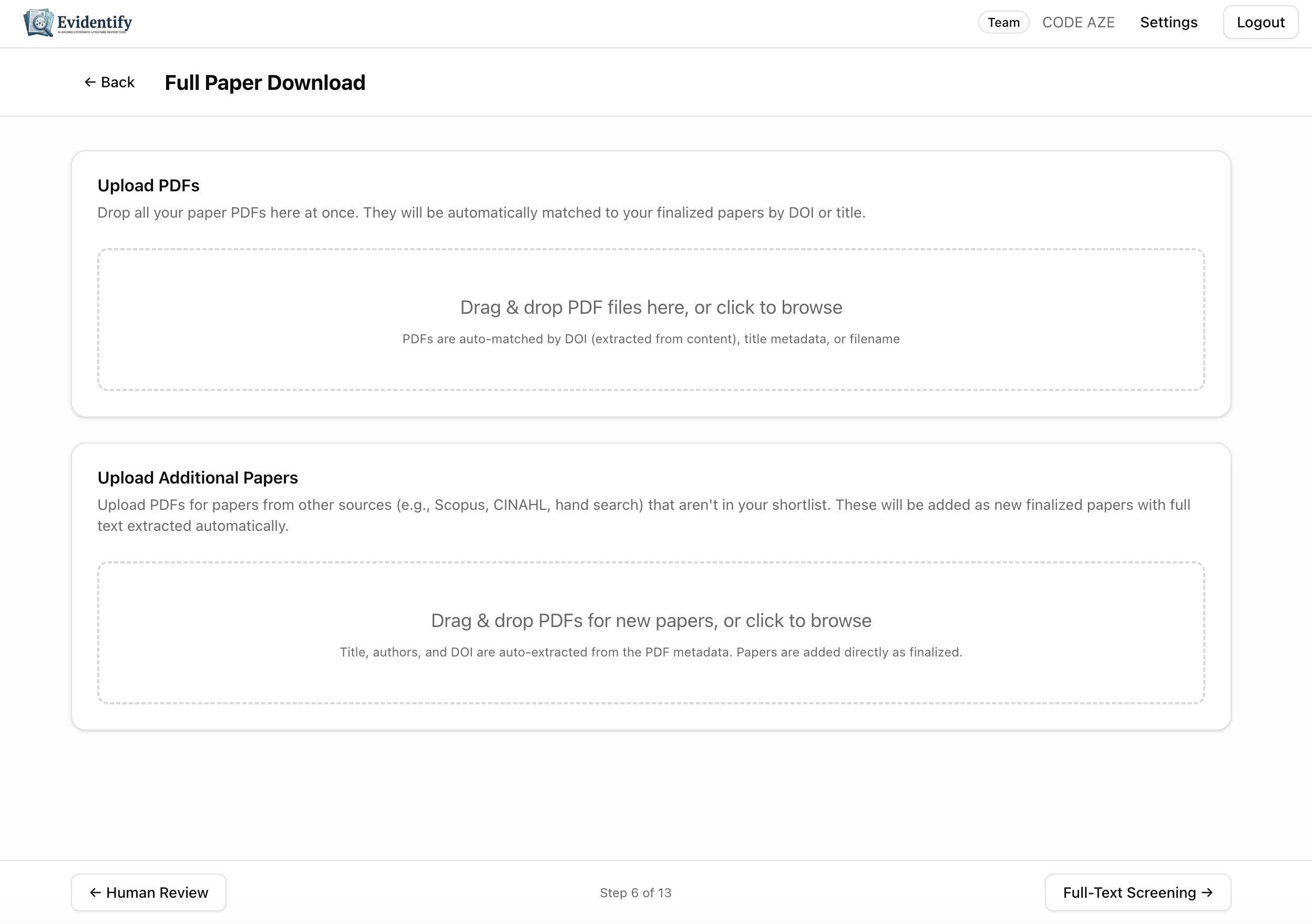 ### Upload PDFs
Two upload zones are available:
Drag and drop PDFs for papers already in your shortlist. EviSyn auto-matches PDFs to papers by **DOI**, **title**, or **filename**.
Upload PDFs for papers from other sources (e.g., hand search, Scopus, CINAHL). These are added as new finalized papers with metadata auto-extracted from the PDF.
### Automatic Retrieval
EviSyn also attempts to retrieve PDFs automatically from:
| Source | Description |
| ------------------------ | ----------------------------------------------------------- |
| **PubMed Central (PMC)** | Free full-text for open-access articles |
| **Unpaywall** | Discovers legally available green/gold open-access versions |
| **Semantic Scholar** | S2 API for additional PDF lookup |
## Step 2: Full-Text Screening
Navigate to **Full-Text Screening** — the AI reads each complete paper and evaluates relevance.
### Upload PDFs
Two upload zones are available:
Drag and drop PDFs for papers already in your shortlist. EviSyn auto-matches PDFs to papers by **DOI**, **title**, or **filename**.
Upload PDFs for papers from other sources (e.g., hand search, Scopus, CINAHL). These are added as new finalized papers with metadata auto-extracted from the PDF.
### Automatic Retrieval
EviSyn also attempts to retrieve PDFs automatically from:
| Source | Description |
| ------------------------ | ----------------------------------------------------------- |
| **PubMed Central (PMC)** | Free full-text for open-access articles |
| **Unpaywall** | Discovers legally available green/gold open-access versions |
| **Semantic Scholar** | S2 API for additional PDF lookup |
## Step 2: Full-Text Screening
Navigate to **Full-Text Screening** — the AI reads each complete paper and evaluates relevance.
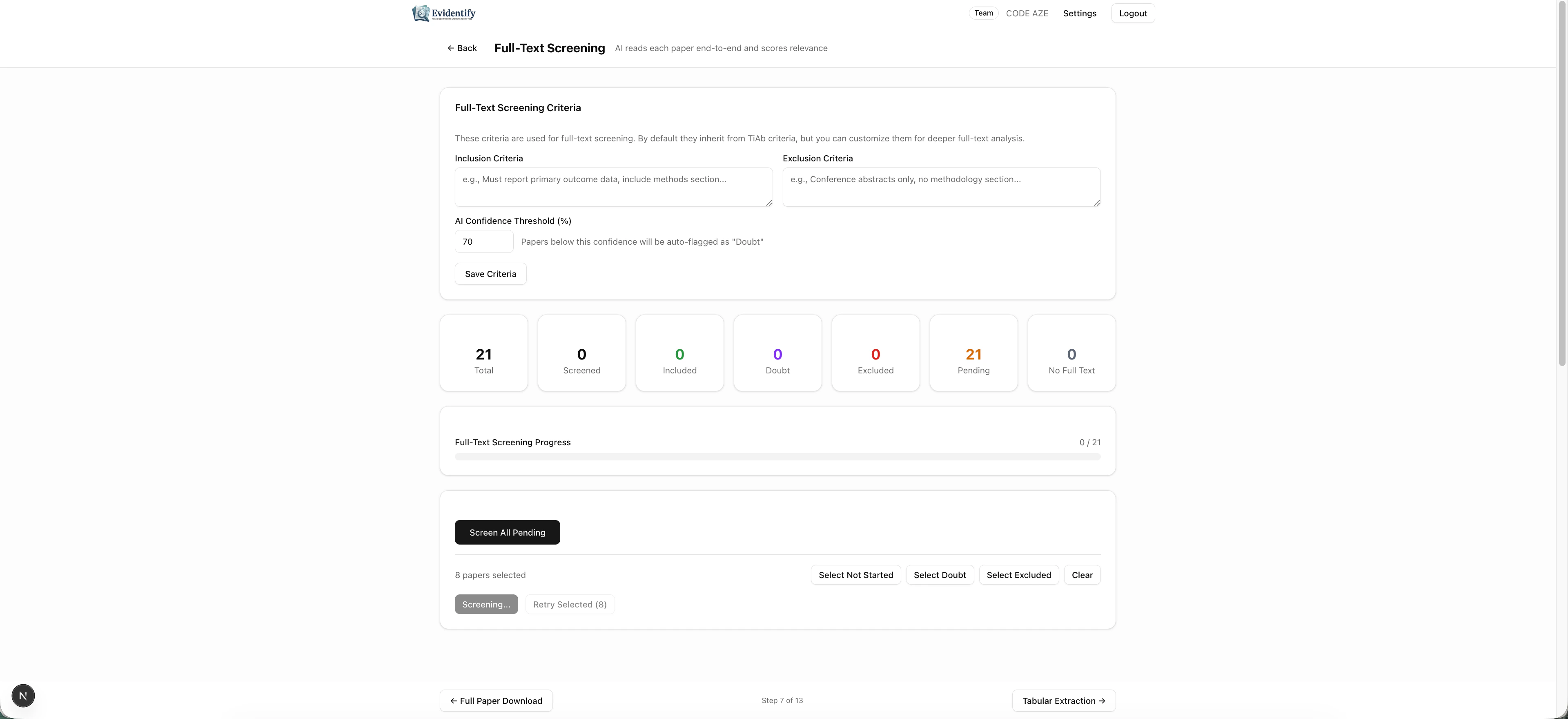 ### Configuration
Like TiAb screening, you can customize:
* **Inclusion Criteria** — defaults inherited from TiAb criteria, editable for deeper analysis
* **Exclusion Criteria** — specific to full-text evaluation
* **AI Confidence Threshold** — papers below this score are flagged as "Doubt"
### Stats Dashboard
| Metric | Meaning |
| -------------------- | ----------------------------------------------------- |
| **Total** | Finalized papers eligible for full-text screening |
| **Screened** | Papers the AI has analyzed |
| **Included** (green) | Papers confirmed as relevant after full-text analysis |
| **Doubt** (orange) | Uncertain — needs human review |
| **Excluded** (red) | Not meeting criteria after full-text review |
| **Pending** | Awaiting screening |
| **No Full Text** | PDFs not yet available |
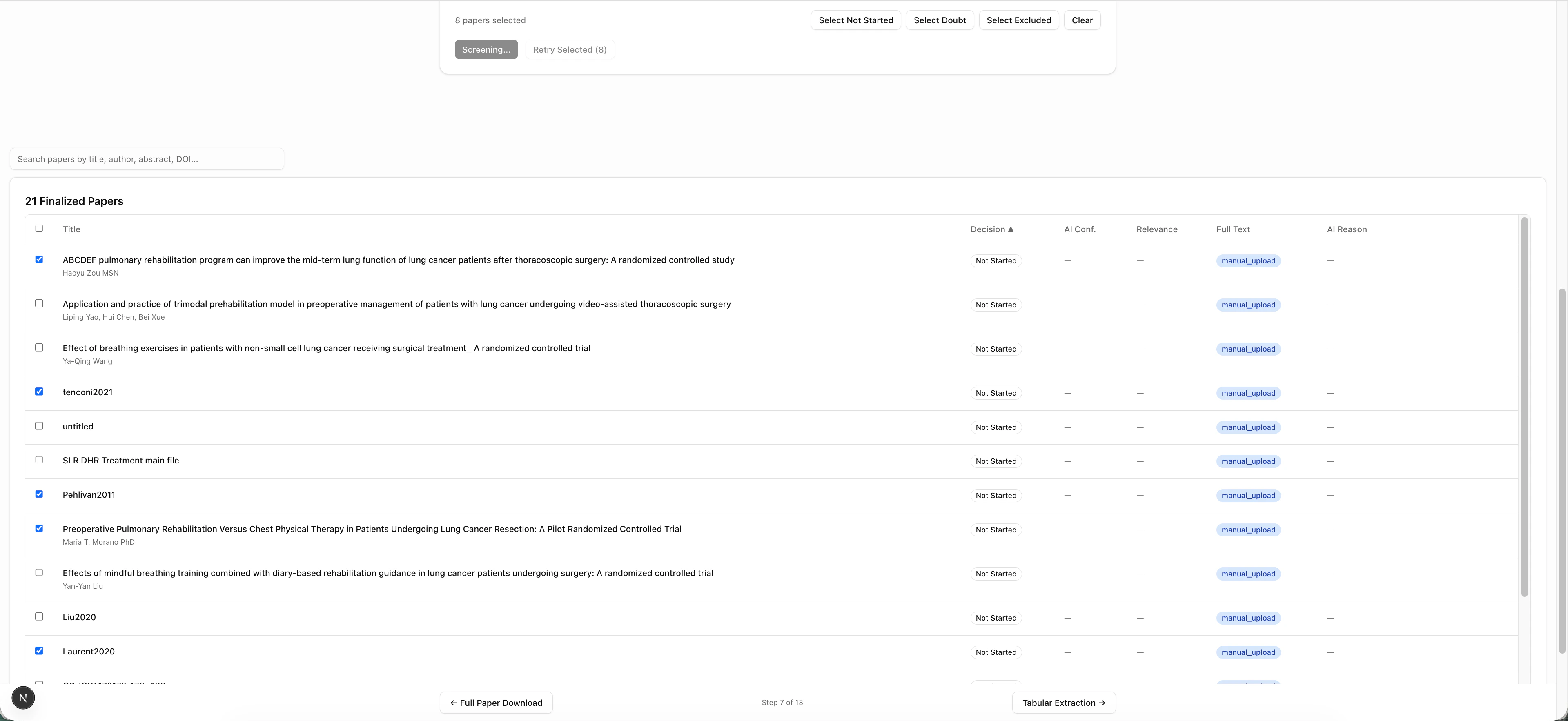
### Screening Controls
* **Screen All Pending** — Run AI screening on all papers with available full text
* **Select Not Started / Doubt / Excluded** — Filter papers by status
* **Screening / Retry Selected** — Re-screen specific papers
### Configuration
Like TiAb screening, you can customize:
* **Inclusion Criteria** — defaults inherited from TiAb criteria, editable for deeper analysis
* **Exclusion Criteria** — specific to full-text evaluation
* **AI Confidence Threshold** — papers below this score are flagged as "Doubt"
### Stats Dashboard
| Metric | Meaning |
| -------------------- | ----------------------------------------------------- |
| **Total** | Finalized papers eligible for full-text screening |
| **Screened** | Papers the AI has analyzed |
| **Included** (green) | Papers confirmed as relevant after full-text analysis |
| **Doubt** (orange) | Uncertain — needs human review |
| **Excluded** (red) | Not meeting criteria after full-text review |
| **Pending** | Awaiting screening |
| **No Full Text** | PDFs not yet available |
### Screening Controls
* **Screen All Pending** — Run AI screening on all papers with available full text
* **Select Not Started / Doubt / Excluded** — Filter papers by status
* **Screening / Retry Selected** — Re-screen specific papers
 ### What the AI Analyzes
For each paper with a PDF, the AI:
* Reads the **entire document** (not just the abstract)
* Evaluates relevance **section by section** (Methods, Results, Population, Intervention, Outcomes)
* Generates a **relevance score** (0-100)
* Provides **section-by-section notes**
* Cites specific passages as evidence
## What's Next?
After full-text screening, proceed to [Data Extraction](/user-guide/data-extraction) to pull structured data from your included papers.
### What the AI Analyzes
For each paper with a PDF, the AI:
* Reads the **entire document** (not just the abstract)
* Evaluates relevance **section by section** (Methods, Results, Population, Intervention, Outcomes)
* Generates a **relevance score** (0-100)
* Provides **section-by-section notes**
* Cites specific passages as evidence
## What's Next?
After full-text screening, proceed to [Data Extraction](/user-guide/data-extraction) to pull structured data from your included papers.