> ## Documentation Index
> Fetch the complete documentation index at: https://docs-evisyn.grabmywork.com/llms.txt
> Use this file to discover all available pages before exploring further.
# Export & Reporting
> PRISMA flow diagram, reference exports, and activity log
The final step generates publication-ready outputs: a PRISMA 2020 flow diagram, reference exports, and a complete audit trail.
## PRISMA 2020 Flow Diagram
Navigate to **Export & Report** from your project dashboard.
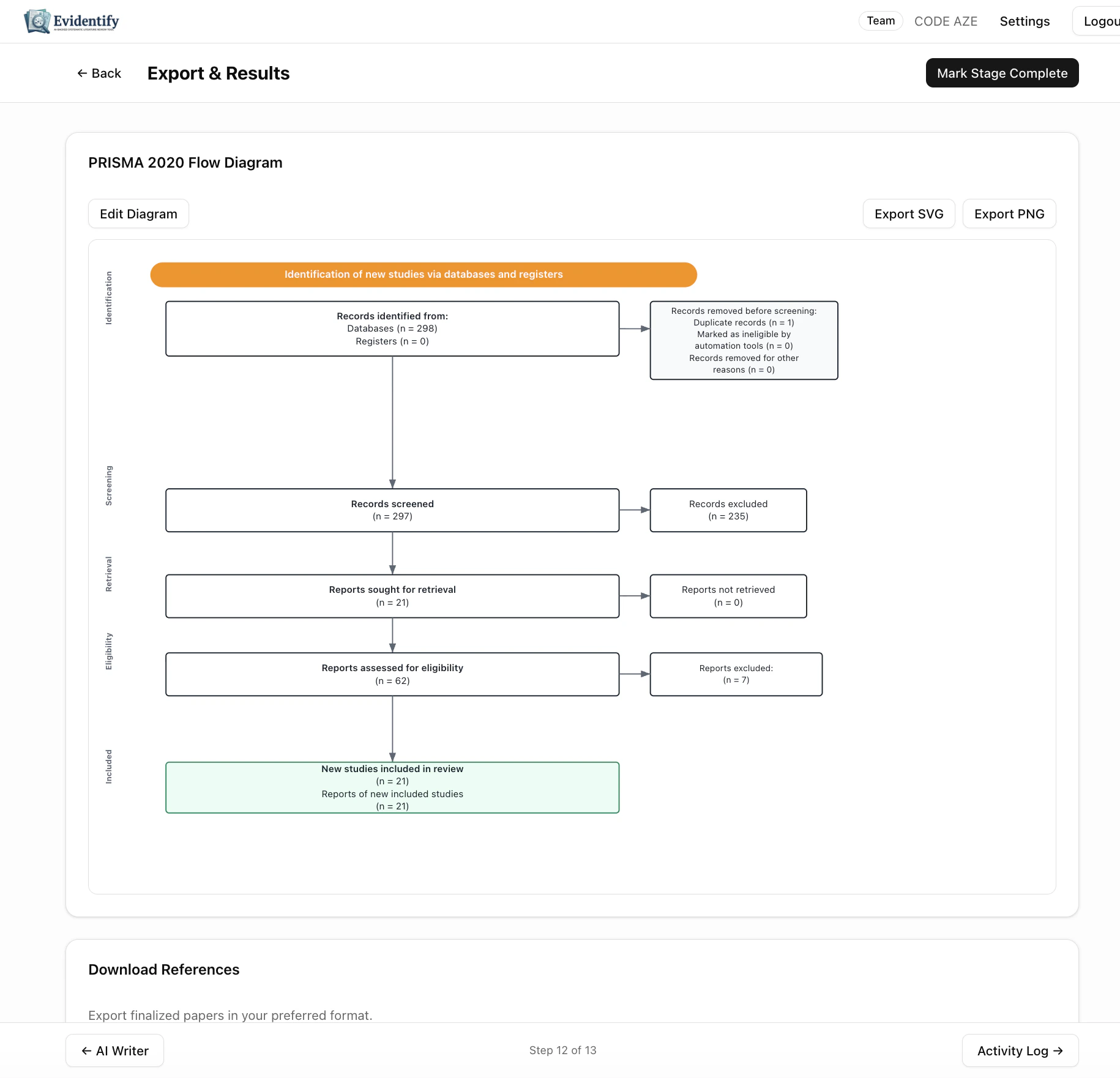 EviSyn automatically generates a **PRISMA 2020-compliant flow diagram** with accurate counts at each stage:
* **Identification** — Records identified from databases and registers
* **Screening** — Records screened, duplicates removed
* **Eligibility** — Reports sought and assessed for eligibility
* **Included** — Studies included in the final review
### Customization
Click **Edit Diagram** to override any count or label. This is useful for:
* Adding records from hand searches or grey literature
* Correcting counts for unusual workflows
* Adding notes or annotations
### Export Formats
| Format | Use case |
| -------------- | ----------------------------------------------------------------- |
| **Export SVG** | Scalable vector graphic — best for publications and presentations |
| **Export PNG** | Raster image — for documents and slides |
## Download References
Export your finalized paper set in standard reference formats:
| Format | Compatible with |
| ---------- | ------------------------------------------ |
| **BibTeX** | LaTeX, JabRef, Zotero |
| **RIS** | EndNote, Mendeley, most reference managers |
| **CSV** | Excel, Google Sheets, any spreadsheet |
## Activity Log
The **Activity Log** (accessible from the last step) provides a complete, immutable audit trail of every action taken in your project:
* **Who** performed each action (user identity)
* **What** was done (screening decision, data edit, status change)
* **When** it happened (timestamp)
* **Details** of the action (old value, new value, reasoning)
### Export
Click **Export CSV** to download the full activity log for:
* Journal submission (reproducibility requirements)
* Regulatory compliance (FDA, EMA submissions)
* Internal auditing
* PROSPERO protocol updates
The activity log is **immutable** — entries cannot be deleted or modified after creation. This ensures the integrity of your audit trail.
## Completing Your Review
Click **Mark Stage Complete** on the Export & Report page to finalize your entire review. Your project status will update to "Completed."
Congratulations — you've completed a full systematic literature review with EviSyn!
EviSyn automatically generates a **PRISMA 2020-compliant flow diagram** with accurate counts at each stage:
* **Identification** — Records identified from databases and registers
* **Screening** — Records screened, duplicates removed
* **Eligibility** — Reports sought and assessed for eligibility
* **Included** — Studies included in the final review
### Customization
Click **Edit Diagram** to override any count or label. This is useful for:
* Adding records from hand searches or grey literature
* Correcting counts for unusual workflows
* Adding notes or annotations
### Export Formats
| Format | Use case |
| -------------- | ----------------------------------------------------------------- |
| **Export SVG** | Scalable vector graphic — best for publications and presentations |
| **Export PNG** | Raster image — for documents and slides |
## Download References
Export your finalized paper set in standard reference formats:
| Format | Compatible with |
| ---------- | ------------------------------------------ |
| **BibTeX** | LaTeX, JabRef, Zotero |
| **RIS** | EndNote, Mendeley, most reference managers |
| **CSV** | Excel, Google Sheets, any spreadsheet |
## Activity Log
The **Activity Log** (accessible from the last step) provides a complete, immutable audit trail of every action taken in your project:
* **Who** performed each action (user identity)
* **What** was done (screening decision, data edit, status change)
* **When** it happened (timestamp)
* **Details** of the action (old value, new value, reasoning)
### Export
Click **Export CSV** to download the full activity log for:
* Journal submission (reproducibility requirements)
* Regulatory compliance (FDA, EMA submissions)
* Internal auditing
* PROSPERO protocol updates
The activity log is **immutable** — entries cannot be deleted or modified after creation. This ensures the integrity of your audit trail.
## Completing Your Review
Click **Mark Stage Complete** on the Export & Report page to finalize your entire review. Your project status will update to "Completed."
Congratulations — you've completed a full systematic literature review with EviSyn!